
Desktop Release Summary (FLiNG Trainer): Download Black Myth: Wukong Trainer (v1.0-v1.0.20+) verified for Windows 10/11 (x64) and macOS Desktop (Apple Silicon M1–M4 / Intel). Package size: 922 KB. Includes complete offline files, setup instructions, save file paths, and troubleshooting notes below.
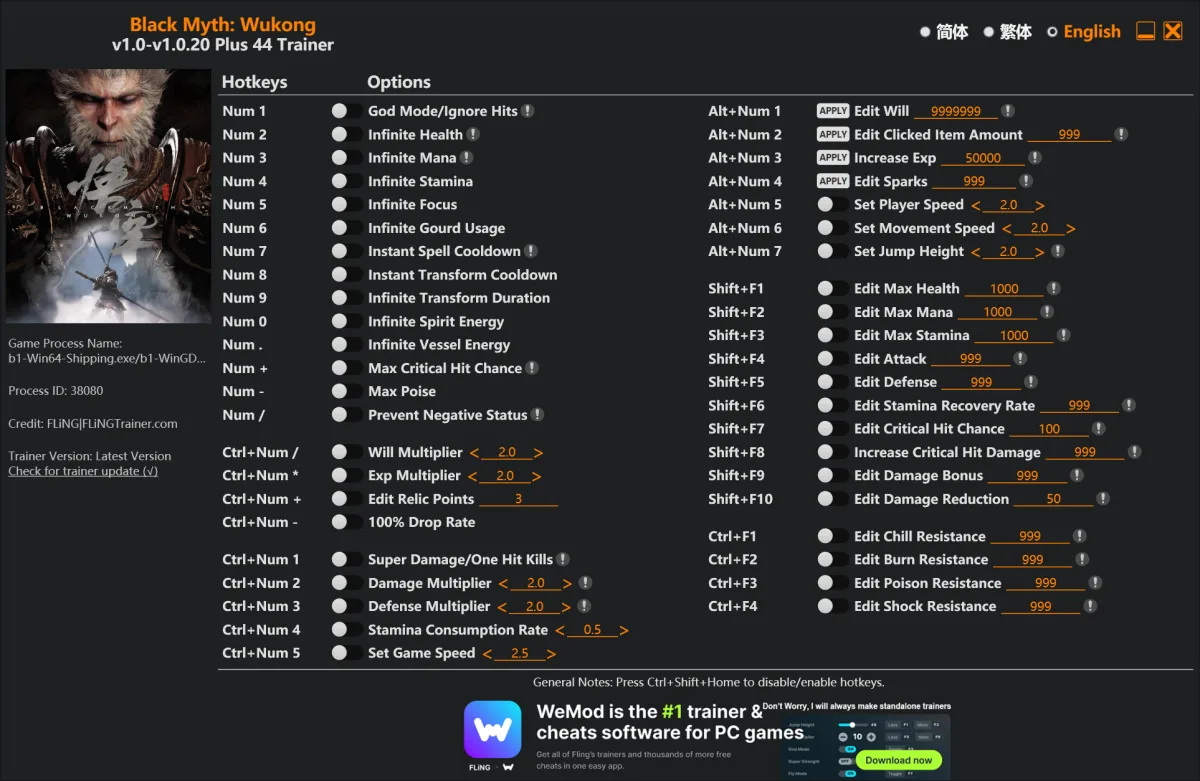 Options
Num 1 – God Mode/Ignore Hits 
Num 2 – Infinite Health
Num 3 – Infinite Mana
Num 4 – Infinite Stamina
Num 5 – Infinite Focus
Num 6 – Infinite Gourd Usage
Num 7 – Instant Spell Cooldown
Num 8 – Instant Transform Cooldown
Num 9 – Infinite Transform Duration
Num 0 – Infinite Spirit Energy
Num . – Infinite Vessel Energy
Num + – Max Critical Hit Chance
Num – – Max Poise
Num / – Prevent Negative Status
Ctrl+Num / – Will Multiplier
Ctrl+Num * – Exp Multiplier
Ctrl+Num + – Edit Relic Points
Ctrl+Num – – 100% Drop Rate
Ctrl+Num 1 – Super Damage/One Hit Kills
Ctrl+Num 2 – Damage Multiplier
Ctrl+Num 3 – Defense Multiplier
Ctrl+Num 4 – Stamina Consumption Rate
Ctrl+Num 5 – Set Game Speed
Alt+Num 1 – Edit Will
Alt+Num 2 – Edit Clicked Item Amount
Alt+Num 3 – Increase Exp
Alt+Num 4 – Edit Sparks
Alt+Num 5 – Set Player Speed
Alt+Num 6 – Set Movement Speed
Alt+Num 7 – Set Jump Height
Shift+F1 – Edit Max Health
Shift+F2 – Edit Max Mana
Shift+F3 – Edit Max Stamina
Shift+F4 – Edit Attack
Shift+F5 – Edit Defense
Shift+F6 – Edit Stamina Recovery Rate
Shift+F7 – Edit Critical Hit Chance
Shift+F8 – Increase Critical Hit Damage
Shift+F9 – Edit Damage Bonus
Shift+F10 – Edit Damage Reduction
Ctrl+F1 – Edit Chill Resistance
Ctrl+F2 – Edit Burn Resistance
Ctrl+F3 – Edit Poison Resistance
Ctrl+F4 – Edit Shock Resistance
Download
| File | Date added | File size | Downloads |
|---|---|---|---|
 Black.Myth.Wukong.v1.0-v1.0.20.Plus.44.Trainer-FLiNG |
2025-10-17 10:38 | 922 KB | 1432333 |
|
Black.Myth.Wukong.v1.0-v1.0.13.Plus.44.Trainer-FLiNG
|
2024-12-14 05:15 | 937 KB | 2166217 |
|
Black.Myth.Wukong.v1.0-v1.0.9.Plus.44.Trainer-FLiNG
|
2024-09-23 05:49 | 933 KB | 1096201 |
|
Black.Myth.Wukong.v1.0.Plus.42.Trainer-FLiNG
|
2024-08-21 05:23 | 929 KB | 3762574 |
|
Black.Myth.Wukong.v1.0.Plus.35.Trainer-FLiNG
|
2024-08-19 21:16 | 927 KB | 1114833 |
Recommended For You: If you enjoy this game, also check out Assassin’s Creed Black Flag Resynced Trainer and Broken Arrow Trainer and Dying Light 2 Stay Human Trainer for more top-rated gameplay.
Looking for more top titles? Explore our complete rankings in the Best Trainers Games guide.
Recommended For You: If you enjoy this game, also check out Dragon’s Dogma 2 Trainer Free Download and Legend of Heroes: Three Kingdoms Trainer Free Download for more top-rated gameplay.
Looking for more top titles? Explore our complete rankings in the Best Trainers Games guide.
Black Myth: Wukong Trainer – Desktop Technical Overview & Release Details
Black Myth: Wukong Trainer (v1.0-v1.0.20+) is available on FLiNG Trainer as a verified, complete desktop release in the Trainers catalog for Windows 10/11 (x64) and macOS Desktop (Apple Silicon M1–M4 / Intel). Every archive hosted in our repository is checked for file integrity so desktop users can download, configure, and launch Black Myth: Wukong Trainer without missing assets, corrupted packages, or unnecessary third-party background bloatware.
Desktop System Requirements & Compatibility Matrix
Before downloading Black Myth: Wukong Trainer, review the desktop hardware and OS compatibility table below to confirm your Windows PC or Mac meets the recommended specifications:
| System Parameter | Windows Desktop (Native x64) | macOS Desktop (Apple Silicon / Intel via CrossOver) |
|---|---|---|
| Target Release | Black Myth: Wukong Trainer (v1.0-v1.0.20+) | Black Myth: Wukong Trainer (64-Bit Process Compatible) |
| Operating System | Windows 10 / Windows 11 (64-bit) | macOS Sonoma / Sequoia (Game Porting Toolkit / CrossOver) |
| Supported Clients | Steam, Epic Games Store, GOG, Ubisoft, EA App | Steam / DRM-Free Desktop Builds |
| Archive Size | 922 KB | Standalone Portable Executable (No Install Required) |
| Safety & Mode | Single-Player / Offline Campaign Use Only | 100% Clean Standalone Build |
How to Install & Configure Black Myth: Wukong Trainer (v1.0-v1.0.20+)
Follow this step-by-step desktop checklist to install and verify Black Myth: Wukong Trainer without common extraction or startup errors:
- Extract the Trainer Archive: Download the latest Black Myth: Wukong Trainer (v1.0-v1.0.20+) trainer package from the attachment table above and extract it to your desktop or game directory using 7-Zip or WinRAR.
- Configure Antivirus / Windows Defender Exclusion: Because memory trainers hook into active game processes, add the trainer executable to your Windows Security exclusion list (or launch via CrossOver/Whisky on macOS) so real-time protection does not block hotkeys.
- Launch Game & Activate Trainer: Start Black Myth: Wukong Trainer first (on Steam, Epic Games, GOG, or Xbox App), wait until the main menu loads, and run the trainer as Administrator.
- Toggle Hotkeys in Real Time: Press the listed Numpad or Ctrl/Alt hotkeys during gameplay to enable or disable options with instant audio confirmation.
Desktop Troubleshooting, Save File Locations & Optimization Tips
- Archive Extraction Errors: Always use the latest 64-bit build of 7-Zip or WinRAR (or The Unarchiver / Keka on macOS) and ensure your destination SSD has at least 2x the archive size in free space during unpacking.
- Missing DLL or Black Screen on Launch (Windows 10/11): Install both
vc_redist.x64.exeandvc_redist.x86.exe, update your GPU drivers, and add the application folder to your Windows Defender exclusion list so real-time scanning does not quarantine legitimate offline binaries. - macOS Apple Silicon (M1/M2/M3/M4) & Save Paths: Windows x64 builds can be launched on macOS Sonoma/Sequoia via CrossOver 24 or Whisky (D3DMetal + MSync enabled). Local save files are stored in
%APPDATA%/%USERPROFILE%\AppData\LocalLow\on Windows and~/Library/Application Support/on macOS.















Call of Duty: Modern Warfare 4зделайте трейнер пожалуста очень нужен???
When using magical weapons (staves, wands, etc.) with the “infinite mana” (infinite magic) feature enabled, the trainer causes the game’s user interface to crash—it disappears from the screen. The interface only reappears once the “infinite mana” feature is disabled; there is no other way to restore it.
Hell is Us pls
pls add infinite updraft and infinite jump cheat
Please also make an Trainer for “RuneScape: Dragonwilds”
Thank you…
Hello Fling,
I’d like to thank you once again for your work here,it is truly invaluable. I have a huge favor to ask regarding the *Enshrouded* trainer (version 1.0).
Previous versions could also be used on dedicated servers. Would it be possible for you to create a version that works in that environment again?
I would be incredibly grateful.
Please update the Assassin’s Creed Shadows’s trainer
Mandragora whisper of the witch tree please
Fling Please Make Traner for Dune Awakening Thanx!
Castlevania please!!!!
Здравствуйте, Fling. Благодарю за вашу работу. Дай вам Бог здоровья и успехов!
Coral Island please!!!
Resonance A Plague Tale Legacy Trainer, Please.
Why still no Call Of Duty Modern Warfare 4 trainer